先看效果
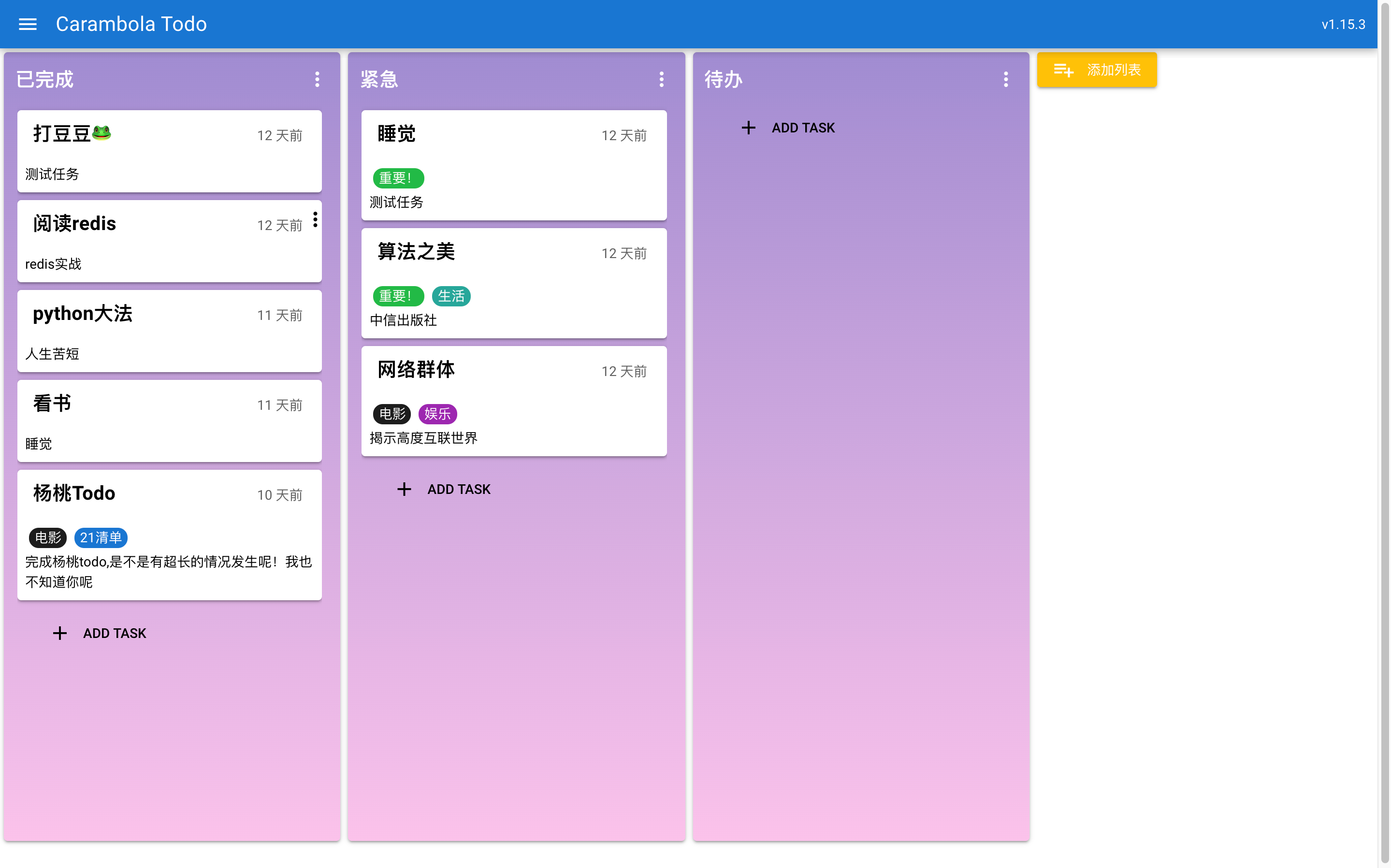
写本项目的目的有几点:
- 学习下vue+electron桌面开发
- 学习下java和spring开发(本人一直使用PHP)
- 一直缺少一款能适合自己的TODO LIST软件,能有桌面端的
可直接打包成dmg、exe 等二进制文件使用。
这是我打包后的效果。
技术栈
- vue
- quasar
- electron
- springboot
- mysql
部分后端知识
自定义注解
@Target({ElementType.METHOD, ElementType.TYPE})@Retention(RetentionPolicy.RUNTIME)public @interface LoginRequired {}自定义一个loginRequired注解,标注是否需要登录
然后在拦截器里进行全局检测
HandlerMethod handlerMethod = (HandlerMethod) handler; Method method = handlerMethod.getMethod(); LoginRequired classRequired = method.getDeclaringClass().getAnnotation(LoginRequired.class); // 判断接口是否需要登录 LoginRequired methodRequired = method.getAnnotation(LoginRequired.class); if (classRequired == null && methodRequired == null) { return true; } appService.initSession(); //token 方式验证 if (request.getSession().getAttribute(App.SESSION_USER) != null) { return true; }@RestControllerAdvice
利用@RestControllerAdvice注解进行全局控制器异常拦截
/** * ConstraintViolationException */ @ExceptionHandler(MethodArgumentNotValidException.class) public Response handleConstraintViolationException(MethodArgumentNotValidException ex) { Map<String, String> errors = new HashMap<>(); ex.getBindingResult().getAllErrors().forEach((error) -> { String fieldName = ((FieldError) error).getField(); String errorMessage = error.getDefaultMessage(); errors.put(fieldName, errorMessage); }); return new Response(ResponseRet.parametrErrror, "参数错误", errors); } /** * 违反约束异常 字段不为空等 * * @param ex * @return */ @ExceptionHandler(ConstraintViolationException.class) public Response handHibernateException(ConstraintViolationException ex) { return new Response(ResponseRet.dbExecuteFail, ex.getSQLException().toString()); } @ExceptionHandler(GenericJDBCException.class) public Response handGenericJDBCException(GenericJDBCException ex) { return new Response(ResponseRet.dbExecuteFail, ex.getSQLException().toString()); }你可以全局处理entity定义的参数约束,或其他异常。
p6spy记录sql和耗时

@Override public void onAfterExecuteQuery(PreparedStatementInformation statementInformation, long timeElapsedNanos, SQLException e) { App.sqlCount.set(App.sqlCount.get() + 1); Long duration = timeElapsedNanos / 1000000; App.sqlDuration.set(App.sqlDuration.get() + duration); Log.info(String.format("执行sql || %s 耗时 %s ms", statementInformation.getSqlWithValues(), duration)); } @Override public void onAfterExecuteUpdate(PreparedStatementInformation statementInformation, long timeElapsedNanos, int rowCount, SQLException e) { App.sqlCount.set(App.sqlCount.get() + 1); Log.info(App.sqlCount.get().toString()); Long duration = timeElapsedNanos / 1000000; App.sqlDuration.set(App.sqlDuration.get() + duration); String singleLineSql = statementInformation.getSqlWithValues().replaceAll("\n", "\\\\n"); Log.info(String.format("执行sql || %s 耗时 %s ms", singleLineSql, duration)); }记录带所有参数的sql和执行耗时
继承DispatcherServlet记录请求参数
protected void doDispatch(HttpServletRequest request, HttpServletResponse response) throws Exception { ContentCachingRequestWrapper requestWrapper = new ContentCachingRequestWrapper(request); ContentCachingResponseWrapper responseWrapper = new ContentCachingResponseWrapper(response); //创建一个 json 对象,用来存放 http 日志信息 ObjectNode rootNode = mapper.createObjectNode(); rootNode.put("uri", requestWrapper.getRequestURI()); rootNode.put("clientIp", requestWrapper.getRemoteAddr());// rootNode.set("requestHeaders", mapper.valueToTree(getRequestHeaders(requestWrapper))); String method = requestWrapper.getMethod(); String contentType = requestWrapper.getContentType(); rootNode.put("method", method); try { super.doDispatch(requestWrapper, responseWrapper); } finally { if (method.equals("GET") || method.equals("DELETE")) { rootNode.set("request", mapper.valueToTree(requestWrapper.getParameterMap())); } else if (contentType.equals("application/x-www-form-urlencoded")) { rootNode.set("request", mapper.valueToTree(requestWrapper.getParameterMap())); } else { JsonNode newNode = mapper.readTree(requestWrapper.getContentAsByteArray()); rootNode.set("request", newNode); } rootNode.put("status", responseWrapper.getStatus()); JsonNode newNode = mapper.readTree(responseWrapper.getContentAsByteArray()); rootNode.set("response", newNode); responseWrapper.copyBodyToResponse();// rootNode.set("responseHeaders", mapper.valueToTree(getResponsetHeaders(responseWrapper))); Log.info(rootNode.toString()); } }源码地址
- 前端 https://github.com/visonforcoding/carambola-todo
- 后端 https://github.com/visonforcoding/carambola-todo-service
原文转载:http://www.shaoqun.com/a/682732.html
yeepay:https://www.ikjzd.com/w/2574
韩蓬:https://www.ikjzd.com/w/1635
先看效果写本项目的目的有几点:学习下vue+electron桌面开发学习下java和spring开发(本人一直使用PHP)一直缺少一款能适合自己的TODOLIST软件,能有桌面端的可直接打包成dmg、exe等二进制文件使用。这是我打包后的效果。技术栈vuequasarelectronspringbootmysql部分后端知识自定义注解@Target({ElementType.METHOD,Elem
贝贝母婴网:https://www.ikjzd.com/w/1321
万国邮政联盟:https://www.ikjzd.com/w/861
汇通天下物流:https://www.ikjzd.com/w/2055
口述:婆婆说只要生儿子被我打骂也愿意:http://lady.shaoqun.com/m/a/273767.html
警惕!"小订单、广撒网"式外贸骗局大揭露!:https://www.ikjzd.com/home/104067
(精品分析)亚马逊美国站游戏手柄类目市场调查数据报告:https://www.ikjzd.com/home/104854

没有评论:
发表评论
注意:只有此博客的成员才能发布评论。