容器技术之Docker私有镜像仓库harbor
 docker-distribution搭建的仓库非常简陋,它甚至连一个用户认证都没有,更别提多用户;今天我们来介绍另外一款docker仓库工具harbor;harbor这款工具相对docker-distribution来讲功能上丰富了许多;它支持多租户,可扩展的API和web ui ,支持跨多个harbor实例的镜像复制,支持身份集成和基于角色的访问控制等等特征;
 前文我们聊到了docker的私有镜像仓库docker-distribution的搭建和简单的使用,回顾请参考https://www.cnblogs.com/qiuhom-1874/p/13058338.html;从前文的搭建和使用过程来看,docker-distribution搭建的仓库非常简陋,它甚至连一个用户认证都没有,更别提多用户;今天我们来介绍另外一款docker仓库工具harbor;harbor这款工具相对docker-distribution来讲功能上丰富了许多;它支持多租户,可扩展的API和web ui ,支持跨多个harbor实例的镜像复制,支持身份集成和基于角色的访问控制等等特征;接下来我们来安装看看harbor吧;
首先我们要去官网下载安装器,目前最新版本是2.0;下载地址https://github.com/goharbor/harbor/releases/tag/v2.0.0;harbor的安装器有在线和离线两个版本,在线包通常较小,适用于网络环境较好地环境中使用,离线包是所有的安装文件和脚本等等打包在一起的;
1、上传已经下载好的安装器到服务器
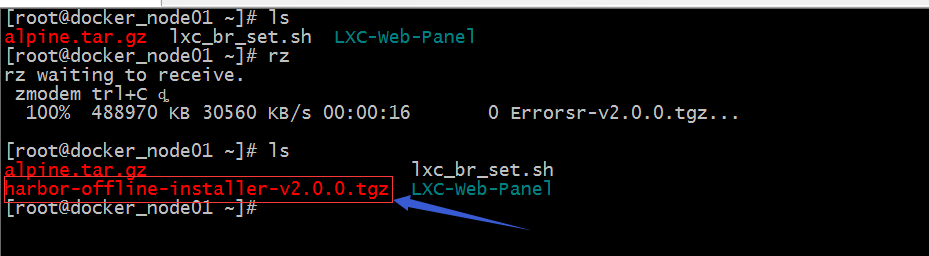
2、解压安装器,并进入到解压后的目录中
[root@docker_node01 ~]# tar xf harbor-offline-installer-v2.0.0.tgz -C /usr/local/[root@docker_node01 ~]# ls /usr/local/bin etc games harbor include lib lib64 libexec sbin share src[root@docker_node01 ~]# cd /usr/local/harbor/[root@docker_node01 harbor]# lscommon.sh harbor.v2.0.0.tar.gz harbor.yml.tmpl install.sh LICENSE prepare[root@docker_node01 harbor]#
3、编辑harbor.yml.tmpl文件,更改必要的配置
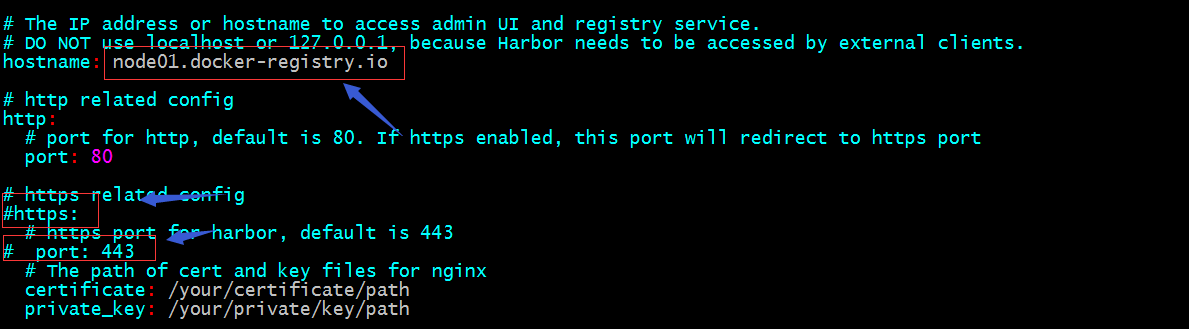
提示:以上我只修改了hostname的值,后面的我都是用默认值;有关这个配置文件的说明,可参考官方文档说明去配置;这里需要注意一点使用https需要自己手动的去申请证书,没有证书文件harbor是不能够正常安装的;
4、把harbor.yml.tmpl重命名为harbor.yml
[root@docker_node01 harbor]# lscommon.sh harbor.v2.0.0.tar.gz harbor.yml.tmpl install.sh LICENSE prepare[root@docker_node01 harbor]# mv harbor.yml.tmpl harbor.yml[root@docker_node01 harbor]#
5、运行install.sh
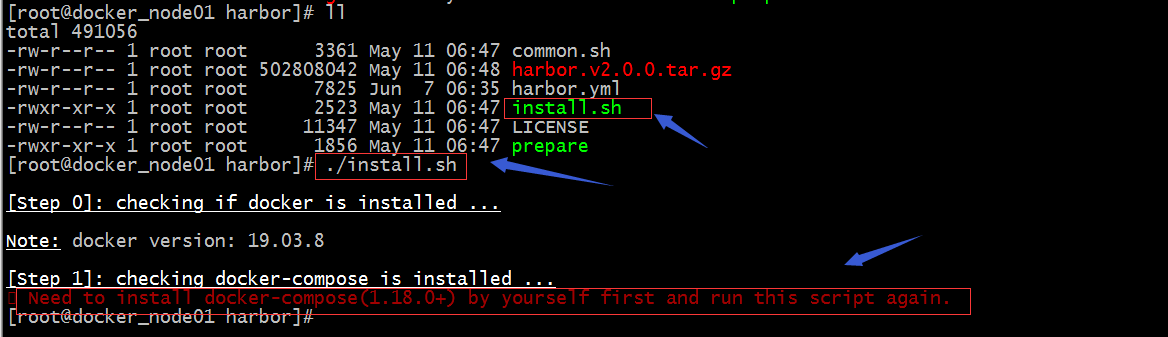
提示:如果运行install.sh脚本出现以上错误,我们需要先安装好docker-compose;
6、安装docker-compose
[root@docker_node01 harbor]# yum install docker-compose -yLoaded plugins: fastestmirrorbase | 3.6 kB 00:00:00 docker-ce-stable | 3.5 kB 00:00:00 epel | 4.7 kB 00:00:00 extras | 2.9 kB 00:00:00 updates | 2.9 kB 00:00:00 (1/3): updates/7/x86_64/primary_db | 2.1 MB 00:00:00 (2/3): epel/x86_64/updateinfo | 1.0 MB 00:00:01 (3/3): epel/x86_64/primary_db | 6.8 MB 00:00:03 Loading mirror speeds from cached hostfile * base: mirrors.aliyun.com * extras: mirrors.aliyun.com * updates: mirror.bit.edu.cnResolving Dependencies--> Running transaction check---> Package docker-compose.noarch 0:1.18.0-4.el7 will be installed--> Processing Dependency: python36-cached_property >= 1.2.0 for package: docker-compose-1.18.0-4.el7.noarch--> Processing Dependency: python36-docker >= 2.6.1 for package: docker-compose-1.18.0-4.el7.noarch……省略部分内容Installed: docker-compose.noarch 0:1.18.0-4.el7 Dependency Installed: python36-PyYAML.x86_64 0:3.13-1.el7 python36-cached_property.noarch 0:1.5.1-2.el7 python36-chardet.noarch 0:3.0.4-1.el7 python36-docker.noarch 0:2.6.1-3.el7 python36-docker-pycreds.noarch 0:0.2.1-2.el7 python36-dockerpty.noarch 0:0.4.1-18.el7 python36-docopt.noarch 0:0.6.2-8.el7 python36-idna.noarch 0:2.7-2.el7 python36-jsonschema.noarch 0:2.5.1-4.el7 python36-pysocks.noarch 0:1.6.8-7.el7 python36-requests.noarch 0:2.14.2-2.el7 python36-six.noarch 0:1.14.0-2.el7 python36-texttable.noarch 0:1.6.2-1.el7 python36-urllib3.noarch 0:1.25.6-1.el7 python36-websocket-client.noarch 0:0.47.0-2.el7 Complete![root@docker_node01 harbor]#
提示:docker-compose是docker容器的单机编排工具;
7、再运行install.sh脚本
[root@docker_node01 harbor]# ./install.sh [Step 0]: checking if docker is installed ...Note: docker version: 19.03.8[Step 1]: checking docker-compose is installed ...Note: docker-compose version: 1.18.0[Step 2]: loading Harbor images ...dbaf2c918102: Loading layer [==================================================>] 34.5MB/34.5MB1f3458bb7308: Loading layer [==================================================>] 8.435MB/8.435MB74e91bd5ca15: Loading layer [==================================================>] 6.317MB/6.317MB82da861dccd3: Loading layer [==================================================>] 14.61MB/14.61MB8d62f2bfdf94: Loading layer [==================================================>] 28.25MB/28.25MB40510e398799: Loading layer [==================================================>] 22.02kB/22.02kB6941a908d292: Loading layer [==================================================>] 49.17MB/49.17MBLoaded image: goharbor/notary-signer-photon:v2.0.0bd70463b9e5a: Loading layer [==================================================>] 8.441MB/8.441MBd3927e3c53ea: Loading layer [==================================================>] 3.584kB/3.584kBa3b2acbb8f7d: Loading layer [==================================================>] 3.072kB/3.072kBde14f7f144ce: Loading layer [==================================================>] 9.71MB/9.71MB94c03f31b276: Loading layer [==================================================>] 10.53MB/10.53MBLoaded image: goharbor/clair-adapter-photon:v2.0.0935e17d700d1: Loading layer [==================================================>] 8.44MB/8.44MBeef8d67e9248: Loading layer [==================================================>] 42.3MB/42.3MBa181769f3c52: Loading layer [==================================================>] 3.072kB/3.072kB4b801e4d76d7: Loading layer [==================================================>] 3.584kB/3.584kB7f7c81a33722: Loading layer [==================================================>] 43.12MB/43.12MBLoaded image: goharbor/chartmuseum-photon:v2.0.04076b322e7f5: Loading layer [==================================================>] 49.89MB/49.89MBda16bbe3a170: Loading layer [==================================================>] 3.584kB/3.584kBf8967a1d9155: Loading layer [==================================================>] 3.072kB/3.072kB6b7eaf984fde: Loading layer [==================================================>] 2.56kB/2.56kB4406aea83cb2: Loading layer [==================================================>] 3.072kB/3.072kB78566a971bf2: Loading layer [==================================================>] 3.584kB/3.584kBe4e05e2ffdad: Loading layer [==================================================>] 12.29kB/12.29kBf3bcf1de026d: Loading layer [==================================================>] 5.632kB/5.632kBLoaded image: goharbor/harbor-log:v2.0.0101133a0a2e6: Loading layer [==================================================>] 8.441MB/8.441MB40eb3ab360dd: Loading layer [==================================================>] 3.584kB/3.584kB172ace267ace: Loading layer [==================================================>] 20.94MB/20.94MBcb361129c579: Loading layer [==================================================>] 3.072kB/3.072kBf0221c34f9dc: Loading layer [==================================================>] 8.721MB/8.721MB1880cedc9407: Loading layer [==================================================>] 30.48MB/30.48MBLoaded image: goharbor/harbor-registryctl:v2.0.015f399ca8b42: Loading layer [==================================================>] 8.441MB/8.441MB182251d62618: Loading layer [==================================================>] 3.584kB/3.584kBc72ce5e8bba9: Loading layer [==================================================>] 3.072kB/3.072kB6cb620513867: Loading layer [==================================================>] 20.94MB/20.94MB8f68617c13e6: Loading layer [==================================================>] 21.76MB/21.76MBLoaded image: goharbor/registry-photon:v2.0.0464d98f962d2: Loading layer [==================================================>] 115.2MB/115.2MB6f577ce93b49: Loading layer [==================================================>] 12.15MB/12.15MB468b747374fb: Loading layer [==================================================>] 3.072kB/3.072kBc7d4e40274a2: Loading layer [==================================================>] 49.15kB/49.15kB349c2528bf8f: Loading layer [==================================================>] 3.584kB/3.584kB50765adb1994: Loading layer [==================================================>] 13.03MB/13.03MBLoaded image: goharbor/clair-photon:v2.0.0f3ae9281f64f: Loading layer [==================================================>] 16.04MB/16.04MB79de921bba64: Loading layer [==================================================>] 28.25MB/28.25MBa4826ccd0680: Loading layer [==================================================>] 22.02kB/22.02kB527c0492bb8a: Loading layer [==================================================>] 50.6MB/50.6MBLoaded image: goharbor/notary-server-photon:v2.0.0da380ff7675f: Loading layer [==================================================>] 39.44MB/39.44MB3e72063a3c12: Loading layer [==================================================>] 3.072kB/3.072kB87063a362784: Loading layer [==================================================>] 59.9kB/59.9kB12042912d563: Loading layer [==================================================>] 61.95kB/61.95kBLoaded image: goharbor/redis-photon:v2.0.0497d39fd8ed4: Loading layer [==================================================>] 10.28MB/10.28MBLoaded image: goharbor/nginx-photon:v2.0.0db89bcd4a7aa: Loading layer [==================================================>] 12.22MB/12.22MBa3c69d8e6487: Loading layer [==================================================>] 3.072kB/3.072kB22888c961e12: Loading layer [==================================================>] 2.56kB/2.56kB15c04c0d67b3: Loading layer [==================================================>] 46.5MB/46.5MB5e59e5738914: Loading layer [==================================================>] 5.632kB/5.632kB2fb21742e876: Loading layer [==================================================>] 51.2kB/51.2kBebe005c22385: Loading layer [==================================================>] 47.32MB/47.32MBe91a77a1cc5d: Loading layer [==================================================>] 2.56kB/2.56kBLoaded image: goharbor/harbor-core:v2.0.0c9ad3414e408: Loading layer [==================================================>] 63.57MB/63.57MB0aea7ae12d77: Loading layer [==================================================>] 60.58MB/60.58MBc3be2cda3349: Loading layer [==================================================>] 5.632kB/5.632kB970c1e4372ae: Loading layer [==================================================>] 2.048kB/2.048kB51e00ddbcdac: Loading layer [==================================================>] 2.56kB/2.56kB27d44e884cd0: Loading layer [==================================================>] 2.56kB/2.56kB3086c2ee0489: Loading layer [==================================================>] 2.56kB/2.56kBefd18d9ef79c: Loading layer [==================================================>] 10.24kB/10.24kBLoaded image: goharbor/harbor-db:v2.0.0ad0a4ed99dd0: Loading layer [==================================================>] 12.22MB/12.22MB50121125e459: Loading layer [==================================================>] 3.072kB/3.072kB6d05b39a8c44: Loading layer [==================================================>] 2.56kB/2.56kB5380ddc5210f: Loading layer [==================================================>] 35.68MB/35.68MBe8053e60aee7: Loading layer [==================================================>] 36.5MB/36.5MBLoaded image: goharbor/harbor-jobservice:v2.0.09fefe33a31db: Loading layer [==================================================>] 9.741MB/9.741MBa52a9b417697: Loading layer [==================================================>] 3.584kB/3.584kB9b6c54642038: Loading layer [==================================================>] 3.072kB/3.072kB6a32c528face: Loading layer [==================================================>] 20.34MB/20.34MB526552ecb5a3: Loading layer [==================================================>] 9.317MB/9.317MBbc3e72205f25: Loading layer [==================================================>] 30.48MB/30.48MBLoaded image: goharbor/trivy-adapter-photon:v2.0.051193d3ba093: Loading layer [==================================================>] 77.29MB/77.29MB398b7c3413c0: Loading layer [==================================================>] 48.31MB/48.31MBcb902b44bae6: Loading layer [==================================================>] 2.56kB/2.56kB11d3bf655c22: Loading layer [==================================================>] 1.536kB/1.536kB3d373d988076: Loading layer [==================================================>] 18.43kB/18.43kB755d5115a4fd: Loading layer [==================================================>] 3.751MB/3.751MB5d456b2e2b47: Loading layer [==================================================>] 249.3kB/249.3kBLoaded image: goharbor/prepare:v2.0.02128feaae029: Loading layer [==================================================>] 10.28MB/10.28MBc1e2c6faf4a4: Loading layer [==================================================>] 8.487MB/8.487MB8728e424e45b: Loading layer [==================================================>] 178.7kB/178.7kB243de4b81324: Loading layer [==================================================>] 157.2kB/157.2kB1909dd7d54dc: Loading layer [==================================================>] 33.28kB/33.28kBe91e103cac7d: Loading layer [==================================================>] 17.41kB/17.41kBef43ac036ce0: Loading layer [==================================================>] 15.36kB/15.36kB3205feaa4e7b: Loading layer [==================================================>] 3.584kB/3.584kBLoaded image: goharbor/harbor-portal:v2.0.0[Step 3]: preparing environment ...[Step 4]: preparing harbor configs ...prepare base dir is set to /usr/local/harborWARNING:root:WARNING: HTTP protocol is insecure. Harbor will deprecate http protocol in the future. Please make sure to upgrade to httpsClearing the configuration file: /config/log/logrotate.confClearing the configuration file: /config/log/rsyslog_docker.confClearing the configuration file: /config/nginx/nginx.confClearing the configuration file: /config/core/envClearing the configuration file: /config/core/app.confClearing the configuration file: /config/registry/passwdClearing the configuration file: /config/registry/config.ymlClearing the configuration file: /config/registry/root.crtClearing the configuration file: /config/registryctl/envClearing the configuration file: /config/registryctl/config.ymlClearing the configuration file: /config/db/envClearing the configuration file: /config/jobservice/envClearing the configuration file: /config/jobservice/config.ymlGenerated configuration file: /config/log/logrotate.confGenerated configuration file: /config/log/rsyslog_docker.confGenerated configuration file: /config/nginx/nginx.confGenerated configuration file: /config/core/envGenerated configuration file: /config/core/app.confGenerated configuration file: /config/registry/config.ymlGenerated configuration file: /config/registryctl/envGenerated configuration file: /config/registryctl/config.ymlGenerated configuration file: /config/db/envGenerated configuration file: /config/jobservice/envCreating harbor-log ... doneloaded secret from file: /data/secret/keys/secretkeyGenerated configuration file: /compose_location/docker-compose.ymlClean up the input dirCreating harbor-db ... doneCreating harbor-core ... done[Step 5]: starting Harbor ...Creating nginx ... doneCreating registry ... Creating harbor-db ... Creating redis ... Creating harbor-portal ... Creating registryctl ... Creating harbor-core ... Creating harbor-jobservice ... Creating nginx ... ✔ ----Harbor has been installed and started successfully.----[root@docker_node01 harbor]#
提示:从上面的信息可以看到harbor导入了很多镜像,然后基于各个镜像间的关系提供配置文件,然后按照一定的依赖关系顺序启动为容器;我们用docker images 可以来看看它导入了那些镜像
[root@docker_node01 harbor]# docker imagesREPOSITORY TAG IMAGE ID CREATED SIZEgoharbor/chartmuseum-photon v2.0.0 4db8d6aa63e9 3 weeks ago 127MBgoharbor/redis-photon v2.0.0 c89ea2e53cc0 3 weeks ago 72.2MBgoharbor/trivy-adapter-photon v2.0.0 6122c52b7e48 3 weeks ago 103MBgoharbor/clair-adapter-photon v2.0.0 dd2210cb7f53 3 weeks ago 62MBgoharbor/clair-photon v2.0.0 f7c7fcc52278 3 weeks ago 171MBgoharbor/notary-server-photon v2.0.0 983ac10ed8be 3 weeks ago 143MBgoharbor/notary-signer-photon v2.0.0 bee1b6d75e0d 3 weeks ago 140MBgoharbor/harbor-registryctl v2.0.0 c53c32d58d04 3 weeks ago 102MBgoharbor/registry-photon v2.0.0 afdc1b7ada36 3 weeks ago 84.5MBgoharbor/nginx-photon v2.0.0 17892f03e56c 3 weeks ago 43.6MBgoharbor/harbor-log v2.0.0 5f8ff08e795c 3 weeks ago 82MBgoharbor/harbor-jobservice v2.0.0 c68a2495bf55 3 weeks ago 116MBgoharbor/harbor-core v2.0.0 3aa3af64baf8 3 weeks ago 138MBgoharbor/harbor-portal v2.0.0 e0b1d3c894c4 3 weeks ago 52.4MBgoharbor/harbor-db v2.0.0 5c76f0296cec 3 weeks ago 154MBgoharbor/prepare v2.0.0 7266d49995ed 3 weeks ago 158MB[root@docker_node01 harbor]# docker ps -aCONTAINER ID IMAGE COMMAND CREATED STATUS PORTS NAMES909486114bab goharbor/nginx-photon:v2.0.0 "nginx -g 'daemon of…" 2 minutes ago Up 2 minutes (healthy) 0.0.0.0:80->8080/tcp nginx201af4781190 goharbor/harbor-jobservice:v2.0.0 "/harbor/entrypoint.…" 2 minutes ago Up 2 minutes (healthy) harbor-jobserviced926598a1b4b goharbor/harbor-core:v2.0.0 "/harbor/entrypoint.…" 2 minutes ago Up 2 minutes (healthy) harbor-coreb655e8bb9da3 goharbor/harbor-portal:v2.0.0 "nginx -g 'daemon of…" 2 minutes ago Up 2 minutes (healthy) 8080/tcp harbor-portal596d050acf8b goharbor/registry-photon:v2.0.0 "/home/harbor/entryp…" 2 minutes ago Up 2 minutes (healthy) 5000/tcp registry88a6b3335d25 goharbor/harbor-registryctl:v2.0.0 "/home/harbor/start.…" 2 minutes ago Up 2 minutes (healthy) registryctlcf8db1840524 goharbor/harbor-db:v2.0.0 "/docker-entrypoint.…" 2 minutes ago Up 2 minutes (healthy) 5432/tcp harbor-db5d522f8f3c38 goharbor/redis-photon:v2.0.0 "redis-server /etc/r…" 2 minutes ago Up 2 minutes (healthy) 6379/tcp redis020fbf3571a2 goharbor/harbor-log:v2.0.0 "/bin/sh -c /usr/loc…" 2 minutes ago Up 2 minutes (healthy) 127.0.0.1:1514->10514/tcp harbor-log[root@docker_node01 harbor]#
提示:可以看到本地仓库中多了很多镜像,同时也启动了很多容器;其中名为nginx的容器把80端口暴露到数组机上了;到此harbor就安装好了;接下来我们访问宿主机的80端口看看是否能够访问到harbor
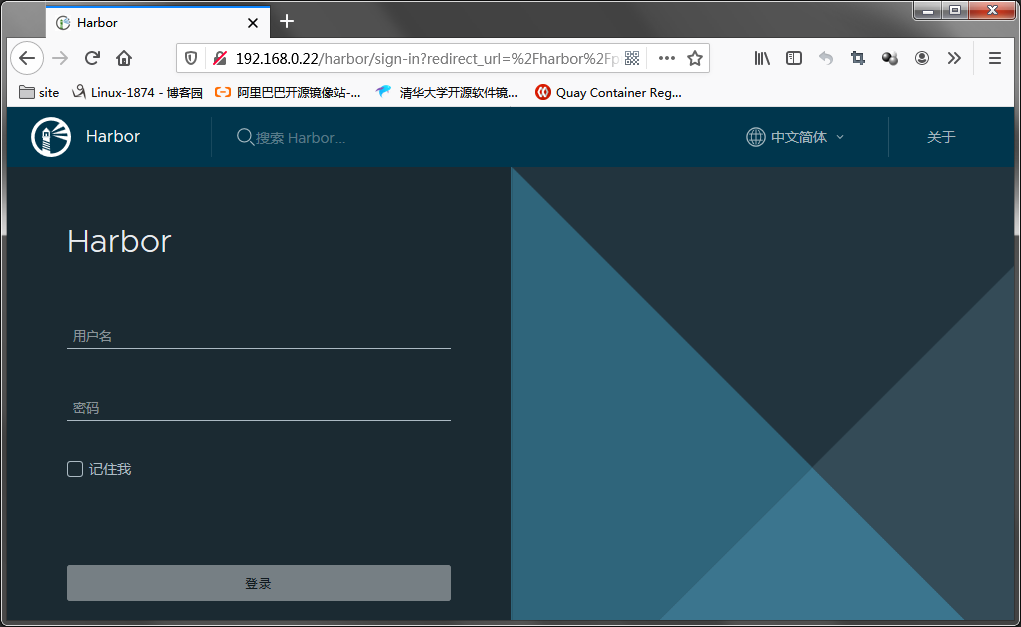
提示:以上就是harbor的web 页面,默认用户名是admin密码是Harbor12345
登录harbor web页面
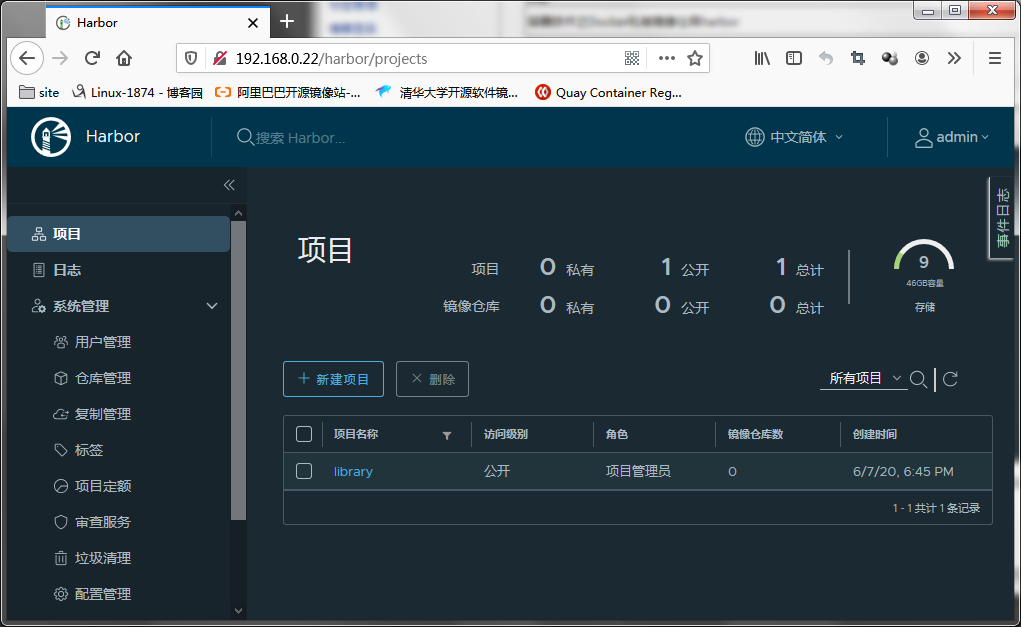
提示:我们就可以基于这个web页面来做管理了;接下来我们先创建一个用户和项目,然后在通过docker push上传镜像到harbor上
创建用户


提示:填写好以上信息,点击确定用户就创建好了;

创建项目

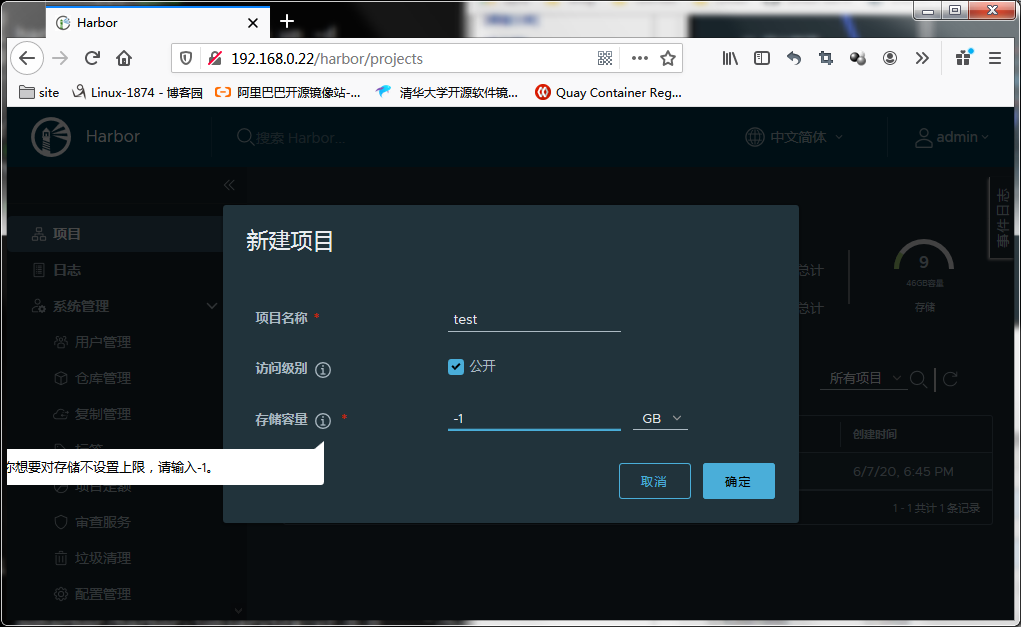
提示:如果创建的项目是私有的,把访问级别后面的公开对勾取消即可

从别的docker主机上上传镜像到harbor
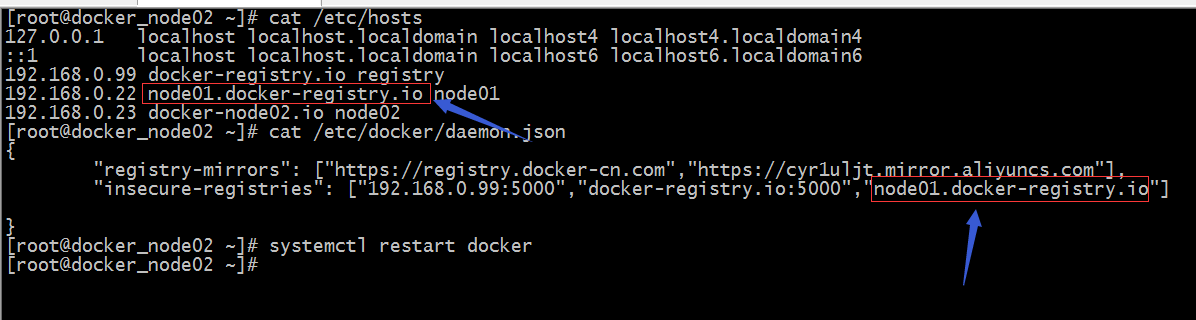
提示:使用非https的仓库必须要在daemon.json文件中配置insecure-registries来声明不安全的镜像仓库地址;
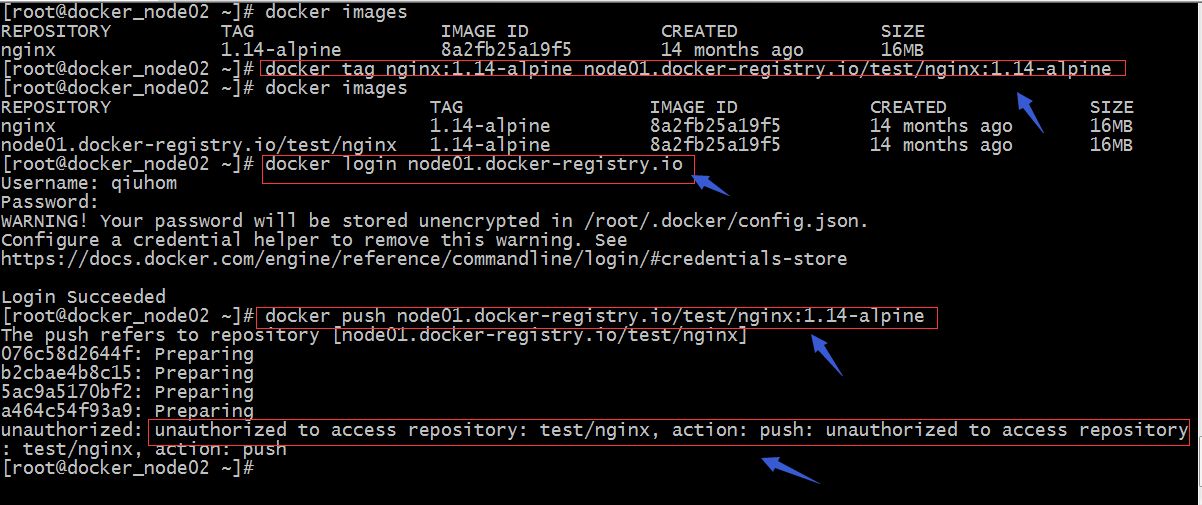
提示:这里提示我们未授权;接下来我们去web管理页面授权qiuhom是test项目的成员;
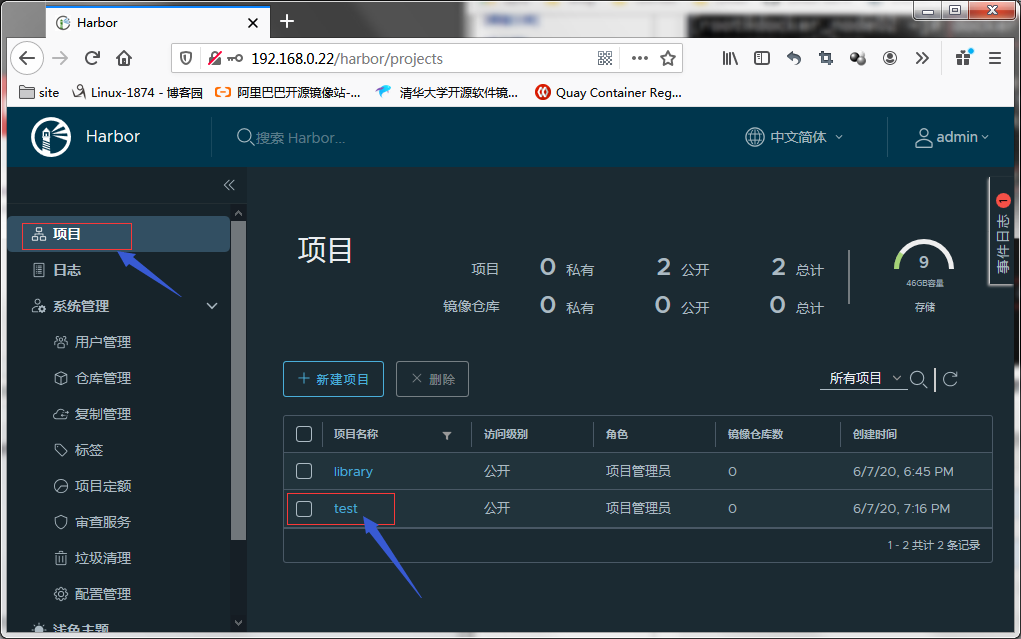
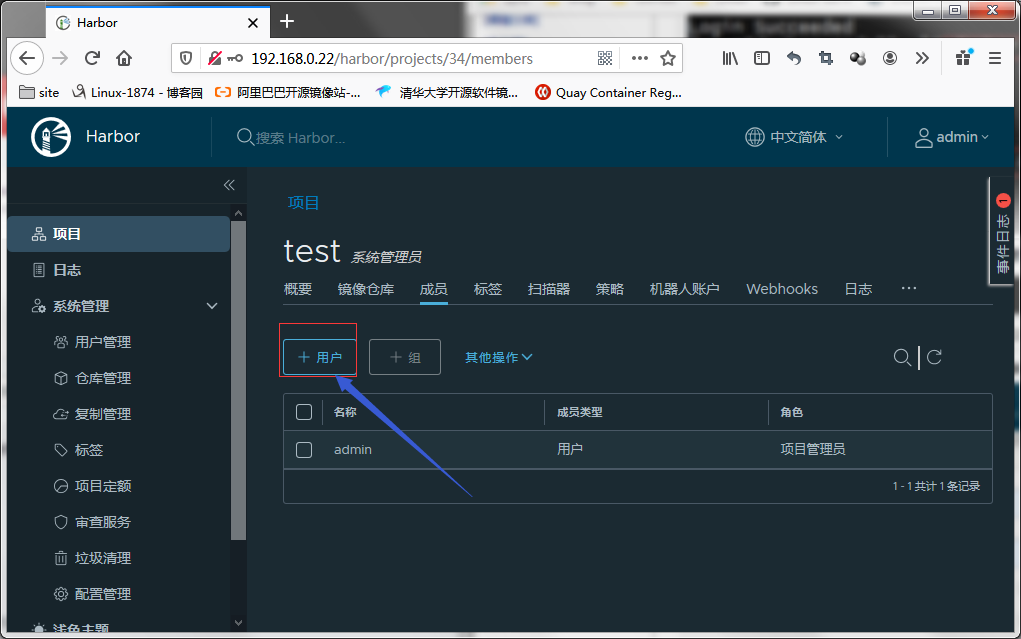
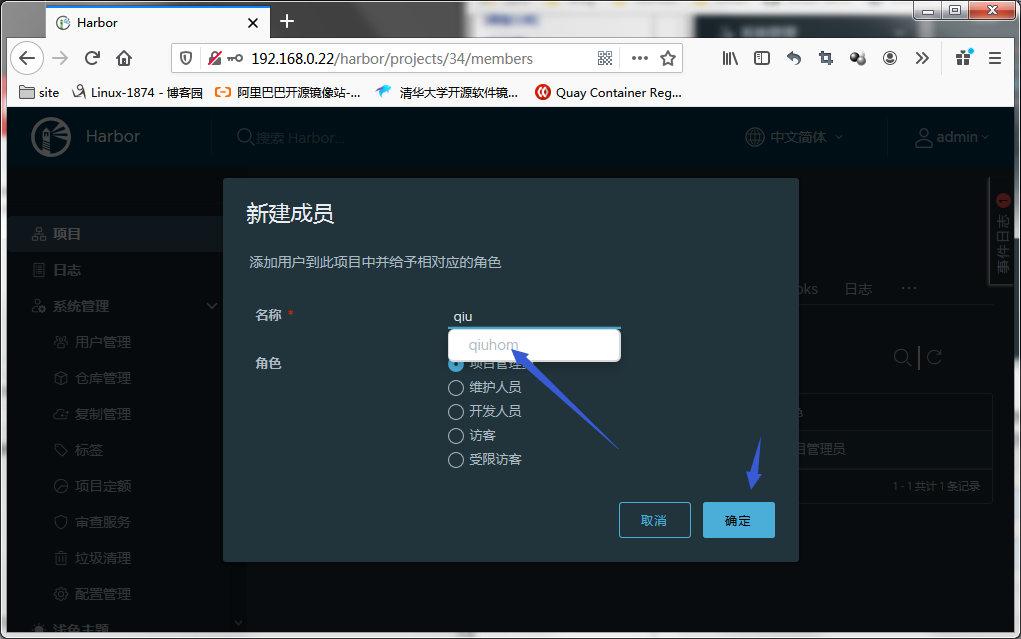
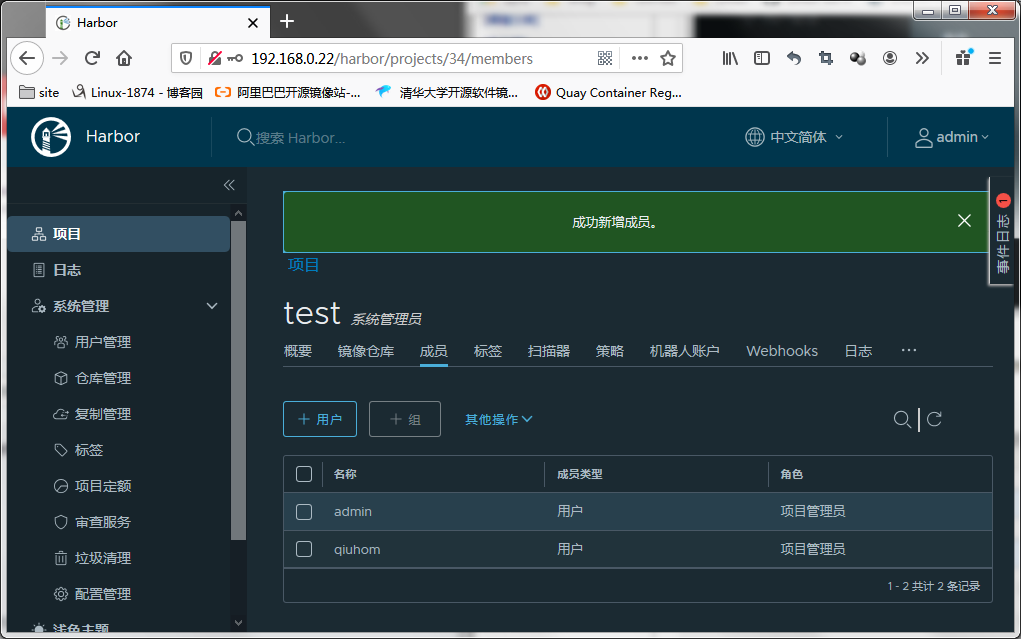
提示:现在我们把qiuhom这个用户设置为test这个项目的管理员,现在我们在以qiuhom的身份推镜像到test项目中,看看是否能够成功把进行推送到harbor上?
[root@docker_node02 ~]# docker push node01.docker-registry.io/test/nginx:1.14-alpineThe push refers to repository [node01.docker-registry.io/test/nginx]076c58d2644f: Pushed b2cbae4b8c15: Pushed 5ac9a5170bf2: Pushed a464c54f93a9: Pushed 1.14-alpine: digest: sha256:a3a0c4126587884f8d3090efca87f5af075d7e7ac8308cffc09a5a082d5f4760 size: 1153[root@docker_node02 ~]#
提示:这次推送镜像没有报错,我们去web页面中看看镜像是否推送到test项目中去了?
验证:在harborweb界面看看是否有我们推上去的镜像?
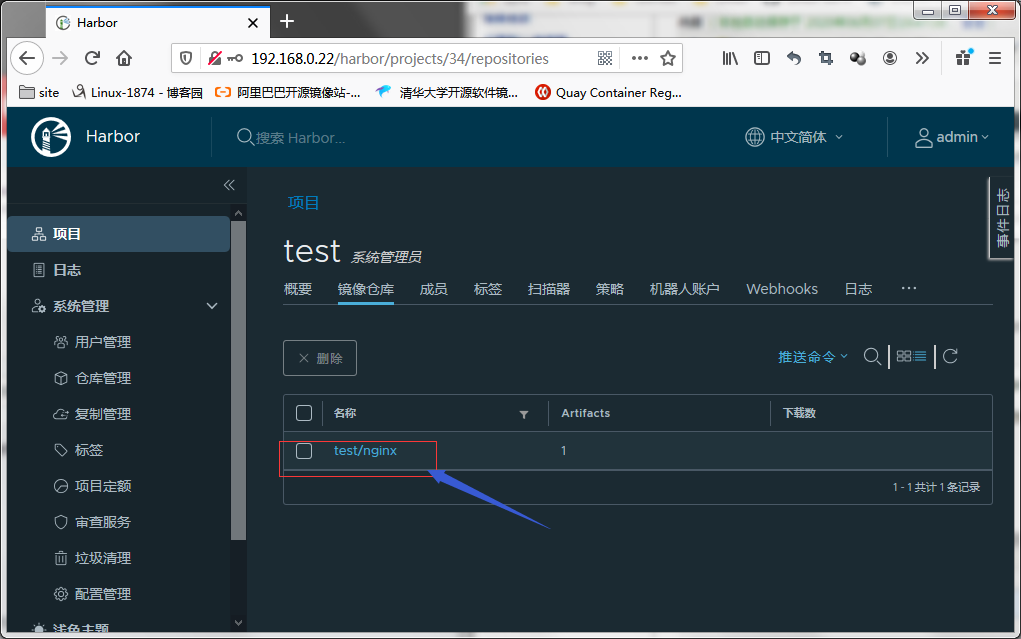
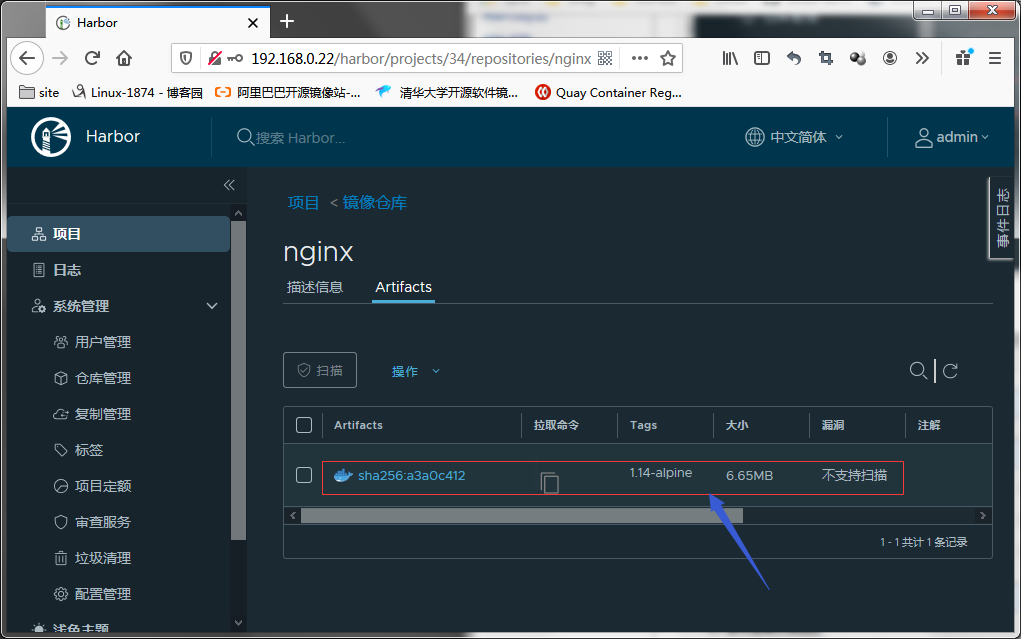
用其他docker主机下载harbor上的镜像
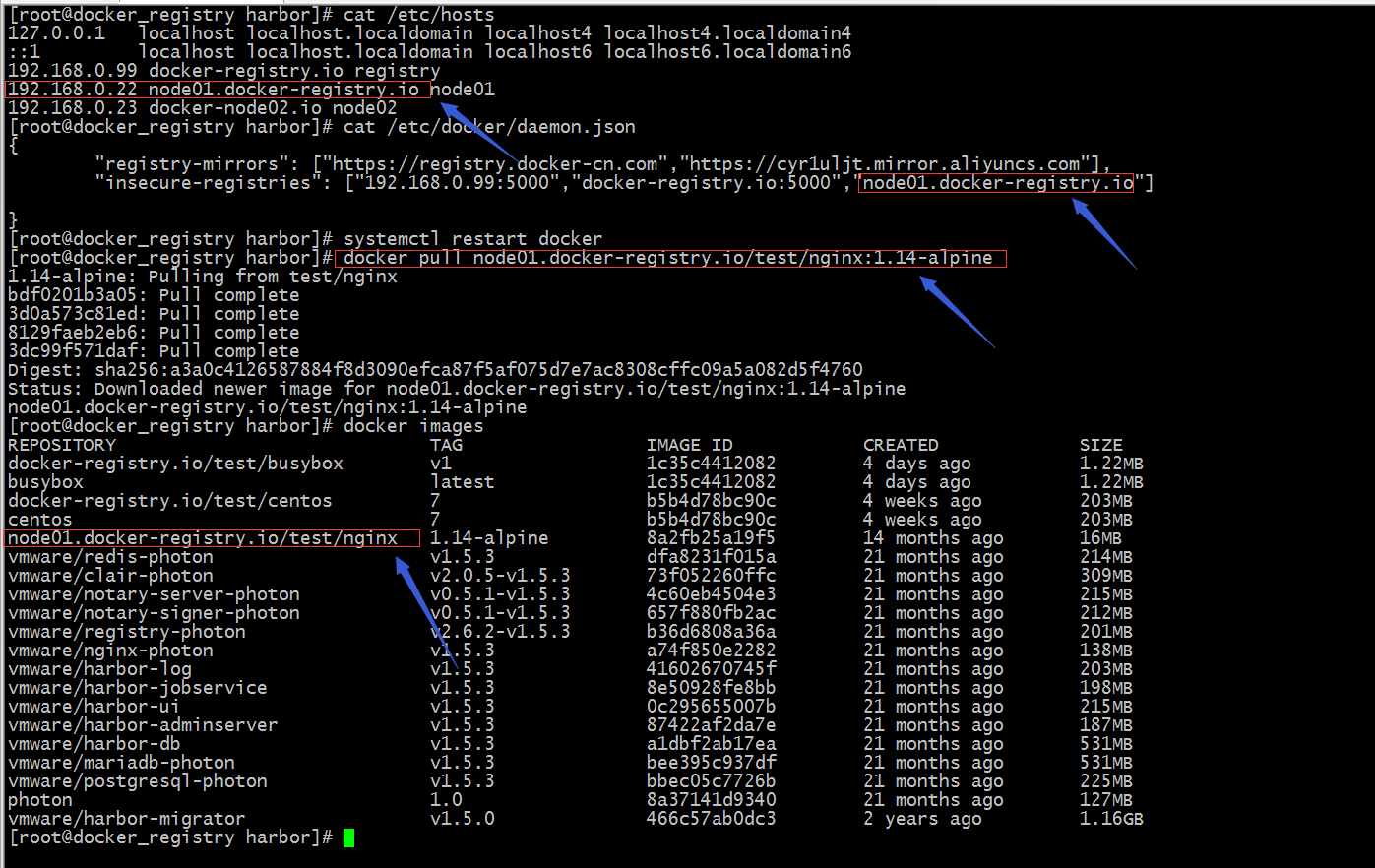
提示:可以看到现在我们搭建的harbor是可以正常下载和上传镜像的;管理镜像我们可以通过web页面管理即可,我这里就不去演示了;接下来我们再来说说在命令行用docker-compose启动harbor和停止harbor吧
停止harbor
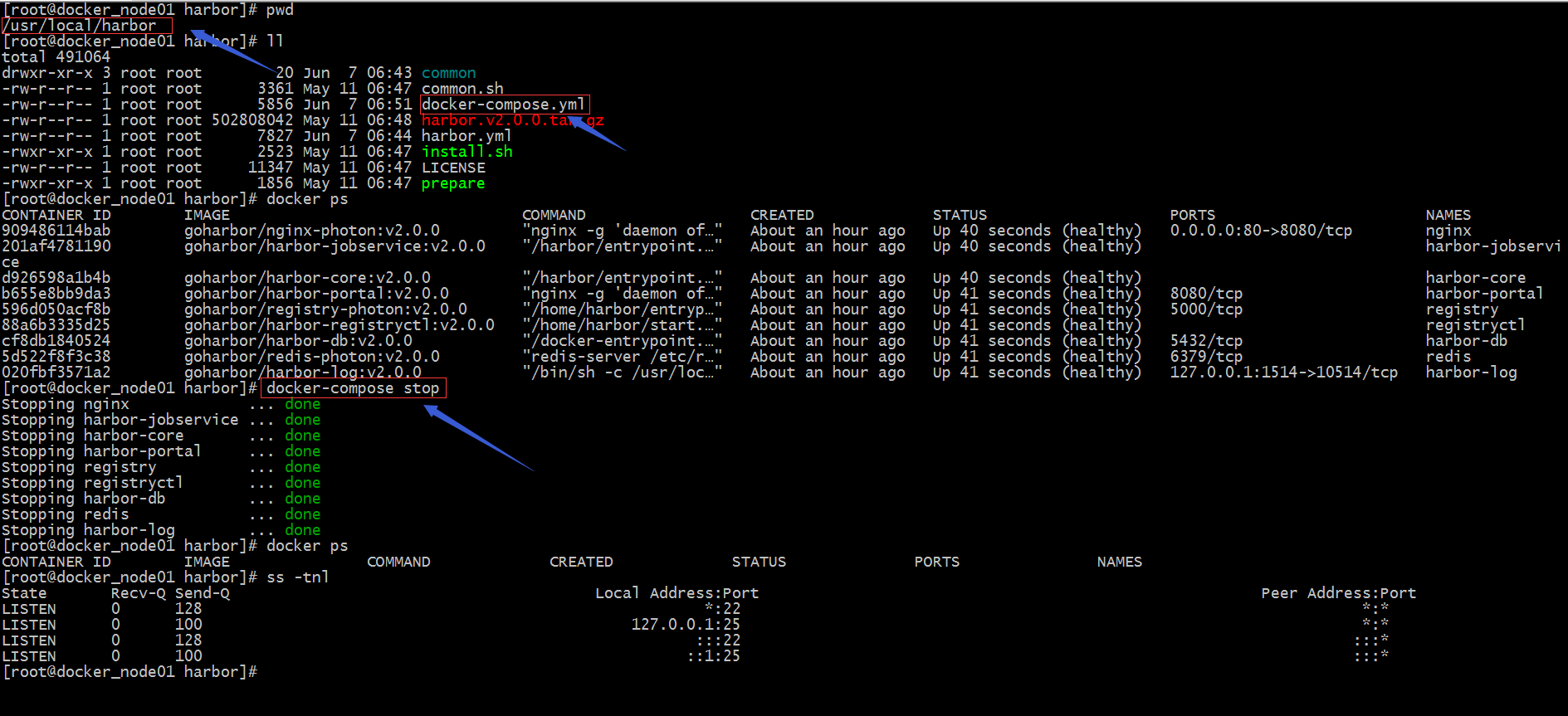
提示:用docker-compose停止harbor需要先进入到harbor目录下,然后执行docker-compose stop 这条命令会去寻找docker-compose.yml文件,根据文件中定义的服务来停止容器;这个有点类似docker build命令,找Dockerfile文件,而docker-compose 是找docker-compose.yml;这里还需要注意一点的是这个文件名必须是docker-compose.yml;
启动harbor

提示:启动huabor同停止harbor一样都必须在docker-compose.yml文件所在目录下执行docker-compose start 或docker-compose up -d ;

没有评论:
发表评论
注意:只有此博客的成员才能发布评论。